Here is a neat trick that I am sure could be expanded to include even more file types, as submitted by reader Frantz. Thanks, Frantz!
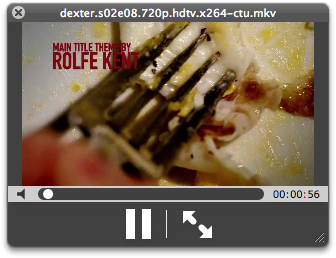
I’ve found a trick allowing me to display Matroska video files in Quicklook without the need of a plugin :
1 / First you need Perian for mkv support in Quicktime : http://perian.org/
2 / Then you need to add a Uniform Type Identifier in Quicktime Player :
– Edit QuickTime Player.app’s /Contents/info.plist
– Add the following code just before the last 2 tags </dict></plist> :
<key>UTExportedTypeDeclarations</key>
<array>
<dict>
<key>UTTypeConformsTo</key>
<array>
<string>public.movie</string>
</array>
<key>UTTypeDescription</key>
<string>Matroska Video File</string>
<key>UTTypeIconName</key>
<string>generic</string>
<key>UTTypeIdentifier</key>
<string>com.apple.quicktime.mkv</string>
<key>UTTypeReferenceURL</key>
<string>http://www.matroska.org/</string>
<key>UTTypeTagSpecification</key>
<dict>
<key>public.filename-extension</key>
<array>
<string>mkv</string>
</array>
</dict>
</dict>
</array>
3 / In Terminal.app
touch /Applications/QuickTime\ Player.app
Et voila that’s all:
December 17th, 2007 at 5:16 pm
[…] some good stuff not on the other so it’s worth keeping an eye on both. Highlights include a neat trick for expanding video format support to mkv (Matroska video) files (and in principle others) and a […]
December 17th, 2007 at 5:26 pm
[…] some good stuff not on the other so it’s worth keeping an eye on both. Highlights include a neat trick for expanding video format support to mkv (Matroska video) files (and in principle others) and a […]
December 17th, 2007 at 8:24 pm
[…] some good stuff not on the other so it’s worth keeping an eye on both. Highlights include a neat trick for expanding video format support to mkv (Matroska video) files (and in principle others) and a […]
December 17th, 2007 at 11:14 pm
this is pretty cool… does anyone know how to display thumbnails for mkv files? is there a tutorial anywhere that shows this?
December 18th, 2007 at 7:16 am
[…] some good stuff not on the other so it’s worth keeping an eye on both. Highlights include a neat trick for expanding video format support to mkv (Matroska video) files (and in principle others) and a […]
December 18th, 2007 at 1:20 pm
I don’t get step 3? Could you explain it for a newbie?
December 18th, 2007 at 2:34 pm
In order for the OS to update Quicktime based off of the changes you made, “touching” the file will force it to update to the latest changes you made to it.
December 18th, 2007 at 5:03 pm
[…] some good stuff not on the other so it’s worth keeping an eye on both. Highlights include a neat trick for expanding video format support to mkv (Matroska video) files (and in principle others) and a […]
December 19th, 2007 at 1:56 pm
[…] some good stuff not on the other so it’s worth keeping an eye on both. Highlights include a neat trick for expanding video format support to mkv (Matroska video) files (and in principle others) and a […]
December 21st, 2007 at 8:01 am
[…] some good stuff not on the other so it’s worth keeping an eye on both. Highlights include a neat trick for expanding video format support to mkv (Matroska video) files (and in principle others) and a […]
December 25th, 2007 at 8:24 am
Hi, nice workaround, but i dont get any sound and there is no thumbnail in finder. Any idea?
Thanks
December 25th, 2007 at 10:46 am
I did exactly what the tip said and the video works but the sound is deafening screech. How can I fix this please?
January 10th, 2008 at 6:14 pm
Minor tweaks result in this working for wmv files, too (assuming you have Flip4Mac installed to allow playing them in the first place):
UTTypeConformsTo
public.movie
UTTypeDescription
Windows Media Player File
UTTypeIconName
generic
UTTypeIdentifier
com.apple.quicktime.wmv
UTTypeReferenceURL
http://www.flip4mac.com/wmv.htm
UTTypeTagSpecification
public.filename-extension
wmv
January 10th, 2008 at 6:15 pm
Oops, didn’t escape any of the characters. Let’s try again:
<array>
<dict>
<key>UTTypeConformsTo</key>
<array>
<string>public.movie</string>
</array>
<key>UTTypeDescription</key>
<string>Windows Media Player File</string>
<key>UTTypeIconName</key>
<string>generic</string>
<key>UTTypeIdentifier</key>
<string>com.apple.quicktime.wmv</string>
<key>UTTypeReferenceURL</key>
<string>http://www.google.com</string>
<key>UTTypeTagSpecification</key>
<dict>
<key>public.filename-extension</key>
<array>
<string>wmv</string>
</array>
</dict>
</dict>
</array>
January 15th, 2008 at 11:12 am
This seems to work for ogg vorbis files.
<key>UTExportedTypeDeclarations</key>
<array>
<dict>
<key>UTTypeConformsTo</key>
<array>
<string>public.audio</string>
</array>
<key>UTTypeDescription</key>
<string>Ogg Vorbis Audio File</string>
<key>UTTypeIconName</key>
<string>generic</string>
<key>UTTypeIdentifier</key>
<string>com.apple.quicktime.ogg</string>
<key>UTTypeReferenceURL</key>
<string>http://www.vorbis.org/</string>
<key>UTTypeTagSpecification</key>
<dict>
<key>public.filename-extension</key>
<array>
<string>ogg</string>
</array>
</dict>
</dict>
</array>
January 19th, 2008 at 4:22 pm
Hi All,
Orri I thought you missed the first line too.
The correct lines are:
UTExportedTypeDeclarations
UTTypeConformsTo
public.movie
UTTypeDescription
Windows Media Player File
UTTypeIconName
generic
UTTypeIdentifier
com.apple.quicktime.wmv
UTTypeReferenceURL
http://www.google.com
UTTypeTagSpecification
public.filename-extension
wmv
Regards,
Steaf
January 20th, 2008 at 10:57 pm
Hmm. Is there another way to add a UTI entry _without_ modifying the original Quicktime Player app’s contents? Where are entries of this kinds usually stored in the system? I’m completely up-to-date with the latest rev of the QT app, so I can’t (or too lazy to) check if this info.plist mod will survive a QT rev update.
As for the sound troubles, it’s likely that the Perian sound prefs are not being honored into the Quicklook Quicktime daemon. The screeching is likely an AC3 soundtrack not being passed through or something like that. That’s my best guess, in any event.
It’d be nice to build a Quicklook module which uses the mplayer module to preview more esoteric movie (container) formats. I’ll take up programming now, and get back to it in a year.
May 23rd, 2008 at 6:31 am
hey.. it has stopped working in 10.5.2 and QT 7.4.5.
i realized it just a few days back. any chance we can see a separate plug-in like for the other files??
i think this work around would break every time there is an update. or atleast is likely to.
May 23rd, 2008 at 7:02 am
edit : it still works. my plist editor was acting up.
it still works.
yay!
July 17th, 2008 at 3:01 pm
I’m new to Macs and I’m having a little trouble with this. I think I found the info.plist but I’m not sure. Is it in systems/library/quicktime/quicktimecomponents.component/contents/info.plist ? That’s where I added the identifier. Also, I typed in Terminal, “touch /Applications/QuickTime\ Player.app” (without quotes) and it told me no such file or directory. What is this newbie doing wrong?
September 8th, 2008 at 4:46 am
I tried to get ogm files working with this: (sadly only audio plays back, video is white, does anyone know why?)
UTExportedTypeDeclarations
UTTypeConformsTo
public.movie
UTTypeDescription
Ogg Vorbis Movie File
UTTypeIconName
generic
UTTypeIdentifier
com.apple.quicktime.ogm
UTTypeReferenceURL
http://www.vorbis.org/
UTTypeTagSpecification
public.filename-extension
ogm
September 13th, 2008 at 5:34 am
Thanks ALLOT – been looking for something like this for AGES! Can confirm that it works for MKV and WMA and OOG (audio) …
PS: Also lack thumbs but its no biggie.
September 16th, 2008 at 12:23 pm
[…] QuickLook is actually very cool, and can be made better with QuickLook plugins. I even found a tweak online to make QuickLook handle .MKV files. […]
November 27th, 2008 at 10:03 am
QT 7.5.5 — video=theora, audio=vorbs — .ogv file extension: fully working:
[code]
UTExportedTypeDeclarations
UTTypeConformsTo
public.movie
UTTypeDescription
Theora Video File
UTTypeIconName
generic
UTTypeIdentifier
com.apple.quicktime.ogv
UTTypeReferenceURL
http://www.theora.org/
UTTypeTagSpecification
public.filename-extension
ogv
[/code]
January 29th, 2009 at 10:19 am
[…] | QuicklookPlugins Comentarios: […]
January 31st, 2009 at 12:33 pm
Ahhh thanks so much! Worked like a charm!
… now if only I could get the thumbnail to display
April 21st, 2009 at 11:28 am
Almost all DVB applications and sat-receivers save video in TS format. Is there a workaround to display TS files in QuickLook?
Thanks.
November 6th, 2009 at 9:02 am
Thanks this guide worked great. Also, awesome use of Dexter in a tutorial.
January 20th, 2010 at 3:08 pm
can someone please upload the tinkered / modified info.plist or at least upload a screenshot where to put the code. (it might be my system setup or whatever, but i can´t get it to work)
thanks in advance
February 20th, 2010 at 2:16 am
[…] mkv video file Quicklook’s preview mkv: Matroska video files Blogged with the Flock Browser settembre 30th, 2009 | Tag: mkv, osx, quicklook | Categoria: […]
March 18th, 2010 at 9:05 am
[…] QuickLook에서 mkv 미리 보기 팁 […]
October 25th, 2010 at 11:58 pm
How I disable this mkv quicklook?
After I try it, I look at CPU usage @_@. Also it is not really fast just like .mov or avi. I know perian is still got some difficulty for handling mkv.
FYI, I already replace modified Quicktime 7 with original one, killall Finder and qlmanage -r. But it still load mkv for quicklook.
Any solution?
March 1st, 2011 at 11:10 am
Thanks! Been looking for something like this for a while.
August 21st, 2011 at 5:04 pm
This still works in Lion. You just need to go to terminal and type:
sudo nano /Applications/QuickTime\ Player.app/Contents/Info.plist
Authorize it and then find the UTExportedTypeDeclarations
After the first then paste in the code from the advice starting after it’s first tag and skipping the last tag.
Then sudo touch /Applications/QuickTime\ Player.app to get it to work again.
March 8th, 2012 at 5:14 am
[…] If you have Perian installed to add .mkv support to Quicktime, you can leverage Perian in Quick Look with this quick hack. […]
March 8th, 2012 at 6:09 am
[…] If you have Perian installed to add .mkv support to Quicktime, you can leverage Perian in Quick Look with this quick hack. […]
March 11th, 2012 at 9:40 am
Hi, thank you for the last comment, but could you please be more precise ?
What i’m supposed to paste and where exactly ?
Thanks in advance !
September 28th, 2012 at 11:10 pm
first of all when I try to edit info.plist it says it needs duplication because it cannot edit the original file.and then in Terminal it returns the message
touch: /Applications/QuickTime Player.app: Permission denied
do I do anything wrong?
April 29th, 2014 at 5:05 am
Jokons,
Just type sudo touch /Applications/QuickTime\ Player.app to get it to work again.
February 15th, 2017 at 9:40 pm
Here’s the version for mka:
UTExportedTypeDeclarations
UTTypeConformsTo
public.audio
UTTypeDescription
Matroska Audio File
UTTypeIconName
generic
UTTypeIdentifier
com.apple.quicktime.mka
UTTypeReferenceURL
http://www.matroska.org/
UTTypeTagSpecification
public.filename-extension
mka
Also consider installing xiph as well: https://xiph.org/quicktime/
it has some codecs Perian lacks.